

Published: 22 Oct 2026 | Author: James Beresford
OneLake storage tiers bring hot, cool and cold storage to Microsoft Fabric, finally giving organisations a cheaper home for data they have to keep but rarely touch. The storage saving is real – cold is about 80% cheaper than hot per GB – but you pay for it in Capacity Units every time that data is read, and on a small Fabric SKU a single read can swamp a capacity for days. This article sets out where tiering pays, where it bites, and the one scenario where we'd switch it on without hesitation.
OneLake storage tiers have finally arrived in Fabric, and like every good reality TV contestant, they look fantastic in the opening montage.
Maz Farrelly, who has produced Big Brother and The Farmer Wants a Wife, reportedly gives contestants a blunt warning before they sign: they'll come out too famous to go back to their old job, but not famous enough to actually be famous. A lot of the data sitting in your Lakehouse is in exactly that spot. Too old to be useful day to day. Too important to delete. And until now, paying full hot-storage rates for the privilege.
OneLake now supports the same hot, cool and cold access tiers Azure Storage has had for years. Everything lands in hot by default. You can move files with the Set Blob Tier API, change a workspace's default tier, or – the bit that matters – define lifecycle rules that move files to cooler tiers based on when they were created, last modified or last accessed, then forget about it.
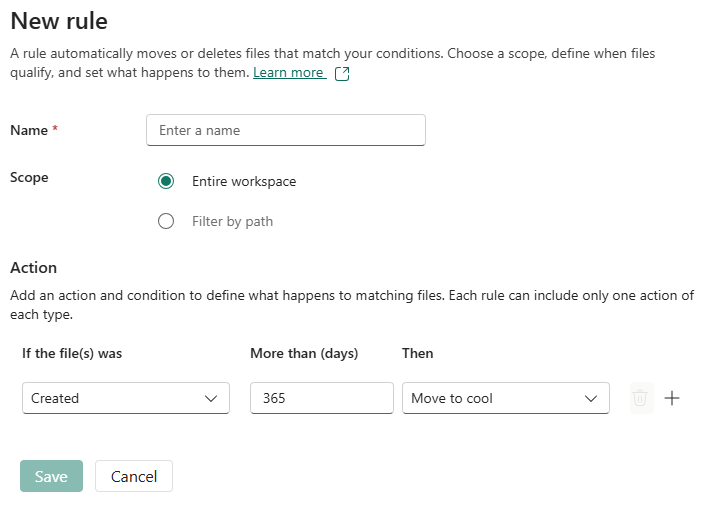 Storage Tier Rules Interface
Australia East pricing tells the good-news story per GB per month:
So ten terabytes kept for five years costs $21,420 in hot and $4,320 in cold.
Full disclosure – Talos is a Microsoft Partner, so we're inclined to like this one. Which is exactly why the next section matters.
Here's the twist they save for the finale. Storage gets cheaper; reading gets dramatically more expensive, and that cost doesn't land on your storage bill. It lands on your capacity.
Cool and cold add a per-GB retrieval charge – 200 CU seconds per GB for cool, 600 for cold – on top of read transactions that cost 2.5 times hot for cool and 25 times hot for cold. Microsoft's own example reads 1 TB once a year: 2,600 CU seconds from hot, 665,000 from cold. Roughly 250 times the compute for the same read.
On an F64, Microsoft puts that at 12% of a day. Fine. But plenty of the organisations we work with run an F2 to F8, and an F2 has 172,800 CU seconds in an entire day. That one cold read is almost four days of the whole capacity. Smoothing spreads the load, but your Power BI users will still feel it…
In dollar terms it isn't frightening. At Australia East pay-as-you-go rates of roughly $0.30 per CU-hour, 665,000 CU seconds is about $55. The risk isn't the invoice. It's throttling everything else on a capacity you sized for your normal workload.
When nobody reads it unless something's gone wrong.
The cleanest case we see is raw landing data. Most well-run Lakehouses keep the original extracts – full API pulls, daily snapshots, source files – so that if a transformation turns out to be wrong, downstream tables can be rebuilt from source. That data is written once and, in a good year, never read again. It's insurance, not inventory.
Take 5 TB of it. Hot costs $178.50 a month; cold costs $36. That's $142.50 a month, or $8,550 over five years, for writing a lifecycle rule.
Now the bad day: you need to rebuild. Reading the full 5 TB back out of cold costs about 3.3 million CU seconds – roughly 60% of an F64's day, or around $276 at Australia East pay-as-you-go rates. The key is that a recovery is a planned event. You can scale the capacity up for an afternoon, run the rebuild, and scale it back down. One rebuild every few years against $1,710 a year in savings is an easy call.
What I wouldn't do is point lifecycle rules at anything a report, a semantic model or a scheduled notebook touches. "Last accessed" sounds safe until a quarterly refresh wakes up a cold table and the capacity melts in the middle of month-end.
OneLake storage tiers are genuinely good news, and overdue. But the saving and the cost land on different lines of the bill, and the cost lands on the one most clients watch hardest. In my opinion the right question isn't "how old is this data?" but "who reads it, and when?"
If you'd like a second opinion on what in your Lakehouse could safely go cold, that's exactly what our Fabric Health Check covers. We'll look at your storage, your capacity headroom and your read patterns, and tell you honestly whether tiering is worth the bother.

At Australia East rates, hot storage is $0.0357 per GB per month, cool is $0.0197 (about 45% cheaper) and cold is $0.0072 (about 80% cheaper). Ten terabytes kept for five years costs $21,420 in hot and $4,320 in cold.
Cool and cold add a per-GB data retrieval charge – 200 CU seconds for cool and 600 for cold – and their read transactions cost 2.5 and 25 times the hot rate. Reading 1 TB from cold uses around 665,000 CU seconds, about 250 times the hot equivalent and almost four days of an F2 capacity.
Data that's only read when something goes wrong, such as raw landing extracts kept so downstream tables can be rebuilt. Keep anything a report, semantic model or scheduled notebook reads in hot, however old it is, and plan capacity for any recovery or audit that reads cold data.
Yes. Cool has a 30-day minimum and cold a 90-day minimum. If you move or delete data before then, you're billed as if it stayed in that tier for the full period.

Get the latest Talos Newsletter delivered directly to your inbox
TECHNOLOGY PARTNERS
Our partners including Microsoft, UiPath, Databricks & Profisee enable us to deliver business outcomes using best of breed technologies and solutions.




Automation & Analytics Technologies for Business

Australian councils face backlogs, staff turnover, and rising community expectations. We help you improve service delivery and operational efficiency through process automation — integrated with TechnologyOne, Civica, and Pathway.

Talos helps organisations build reporting solutions using Jet Analytics
Talos helps organisations build modern data and analytics platforms using Databricks, Microsoft Fabric and Power BI. We work from strategy through implementation, ensuring you get value from the platform without unnecessary complexity.


OneLake storage tiers let you store Microsoft Fabric data in hot, cool or cold storage – the same access tiers Azure Storage uses. All three are online with the same retrieval latency. Data lands in hot by default, and lifecycle rules can move files to cooler tiers automatically based on when they were created, last modified or last accessed.