
Published: 10 Nov 2026 | Author: James Beresford
There was no separate monthly round-up in September. Microsoft folded it into FabCon Europe in Barcelona instead, and the Fabric summary alone came in at a 2 hour read. October's Power BI summary was much lighter. Across both, the direction is hard to miss: Fabric is being built for a world where agents do much of the building and most of the asking. This is where I see BI heading: Power BI semantic models become the engine powering agents, and charts become throwaway items in the conversation. The days of building out suites of reports are coming to an end. FabCon APAC also comes to Sydney from 6 to 9 April 2027, so expect plenty more of this conversation locally. Microsoft's full summaries are linked at the end.
If you change one Power BI habit this quarter, make it this one. PBIR, the enhanced report format, is now the default. If you open a report still in the legacy format, edit it and save it, Desktop converts it to PBIR automatically. Microsoft documents the backup and restore behaviour, but it's a one-way step for that file.
So what actually changes? The legacy format stored a report's layout as one large, dense JSON blob. PBIR breaks the report into a folder structure, with pages, visuals and bookmarks each in their own readable file. Pair that with Power BI Projects (PBIP) and TMDL for the semantic model, and the whole report is plain text. It sits in Git, diffs cleanly and can be reviewed like code.
That's useful for source control. For AI-driven development, it's essential. An agent works best on a PBIP project, where the report is a folder of well-structured text files it can read and write directly. It can change one visual without touching the rest, and show you exactly what it changed. That's the format Microsoft's Power BI Report Authoring skill is built for, which I cover in the next section. Everything there depends on PBIR being in place.
Power BI Agentic Experiences are now GA, although some of the underlying skills and tools are still labelled preview. You give an agent a requirements document, or even a screenshot of the layout you want. It inspects the semantic model, writes DAX measures, builds pages and visuals, validates its work and iterates. October extended the authoring skill to custom visuals, so the agent can add, bind and format those too.
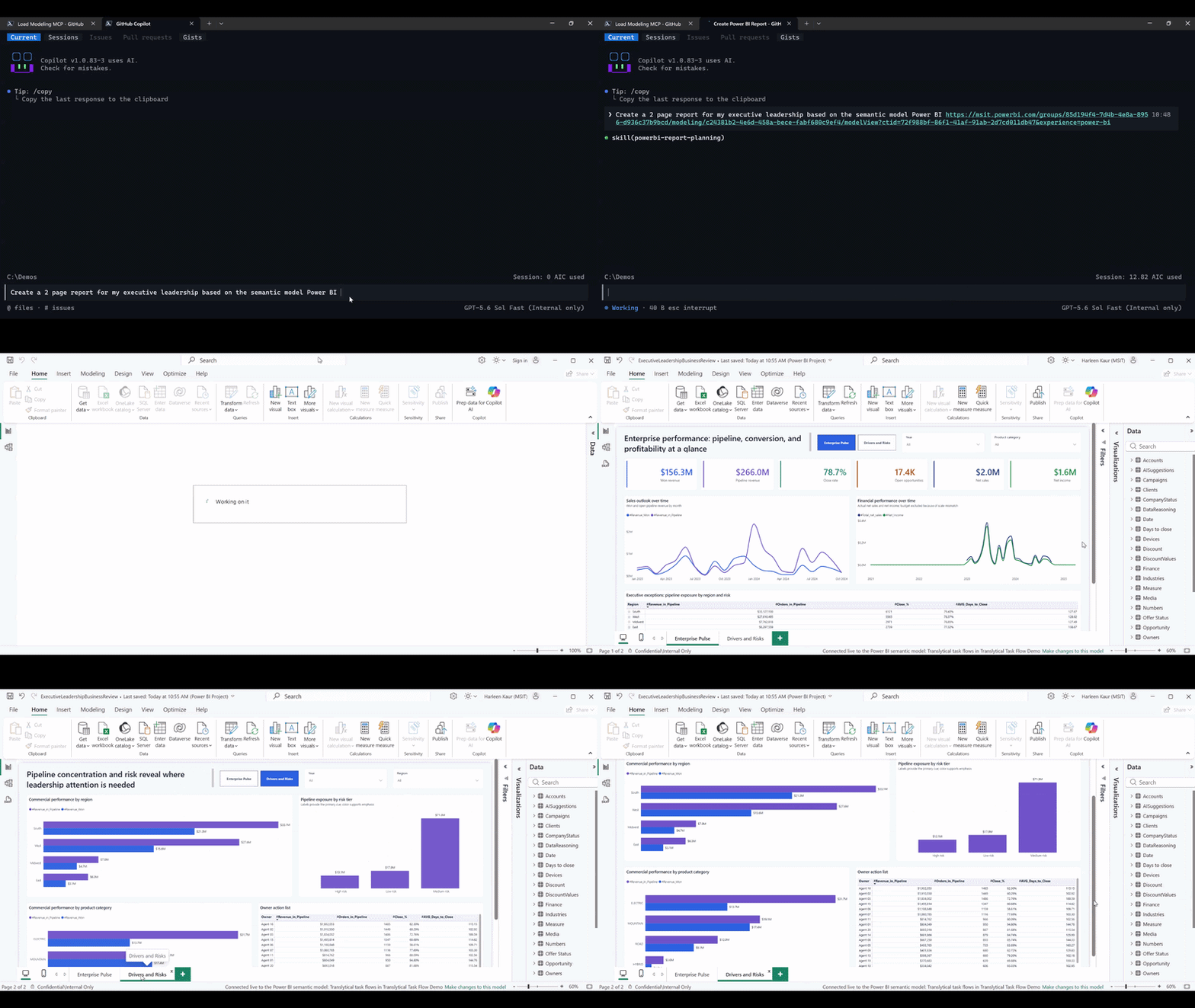
The engine behind this is a set of agent skills. The Report Authoring skill (powerbi-report-authoring) lets an agent create, modify and validate PBIR report definitions from plain-English instructions. You won't find it in the Power BI ribbon. It ships in the Power BI Authoring plugin in Skills for Fabric, Microsoft's catalogue of agent skills, which lives in the public microsoft/skills-for-fabric GitHub repo. You add that marketplace to GitHub Copilot CLI and install the powerbi-authoring plugin. That also brings in the semantic model authoring skill and registers the Power BI Modeling MCP server. It's optimised for GitHub Copilot CLI, but it also works with VS Code Copilot, Claude Code, Cursor and Codex. If you turn on the Desktop Bridge preview feature in Power BI Desktop, the agent can reload Desktop so its changes appear as it works. Microsoft's Install Skills for Fabric guide walks through the setup.
Fabric IQ in Copilot Chat and the Cowork plugin are also GA. They bring governed Power BI answers into the tools people already use, with existing permissions and row-level security respected. Then there's the sneak peek of Modern Report Builder. You describe an app in natural language and start from a trusted semantic model, and it generates something that accepts input, holds state and writes data back. The commercial detail worth noting is that Pro and PPU customers are slated to get Fabric Apps and Fabric Database capabilities, up to 1 GB per app, at no additional cost.
My take: reports are on their way to becoming throwaway objects. Today a report is a carefully built artefact that someone maintains for years. More and more, it'll be generated inside an agent conversation to answer a specific question, used once, then discarded. That makes it closer to a restaurant docket than the menu board on the wall. Agents will become the main way people interact with data, and a report is just one of the things an agent hands you. In that world the durable asset is the semantic layer underneath, which is why the Fabric IQ items further down matter so much.
F0 and on-demand billing were announced in preview at FabCon. I've written about what that means for your capacity bill in Fabric Cost Management: F0, Reserved vs PAYG and Scheduled Pausing, so I won't repeat it here.
At the other end of the scale, F4096 and F8192 are now GA. The previous ceiling was F2048, so the largest capacity just quadrupled. Then there's the price tag. At pay-as-you-go rates an F8192 comes to about A$1,784,741 a month, or roughly A$21.4 million a year. Wow. Very few organisations will ever need one, but it tells you the size of the workloads Microsoft expects Fabric to carry.
Policies (preview) is the governance item I'd pay most attention to. For the first time, you can control what a workspace member can actually do, not just whether they're in the workspace. Until now, a workspace role was a blunt instrument. Once someone was a Contributor, they could create pretty much any item type they liked, and tenant settings were too broad to narrow that down. Policies close the gap by checking the user or group, the item type, the workspace and the capacity before deciding whether an action is allowed.
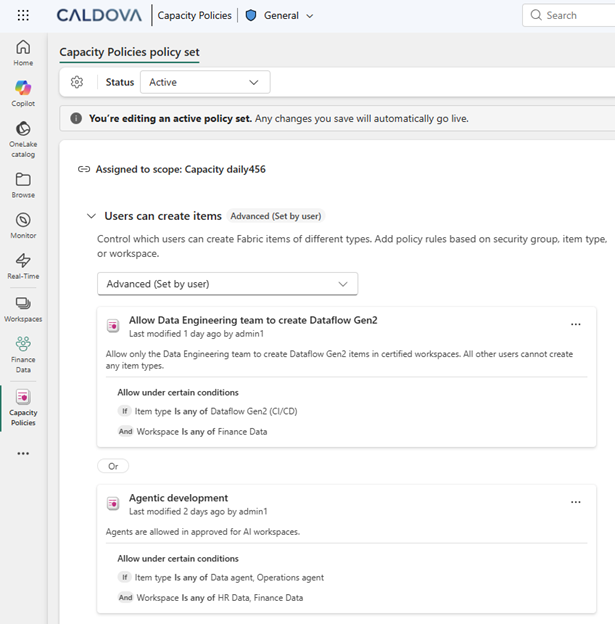
Microsoft's example shows how this works in practice. Only the Data Engineers group can create Lakehouses, Notebooks and Pipelines in designated production workspaces, while self-service carries on everywhere else. The first scenarios cover item creation and workspace security, with more policy types to follow. Policies are managed centrally in the OneLake catalog, with APIs and CI/CD support. That means governance rules can be deployed like code rather than configured one workspace at a time. If you've ever had the sprawl conversation about who's creating what in production, this gives you a real answer to it.
Result-set caching is now GA and on by default for warehouses and lakehouse SQL analytics endpoints. Eligible repeated SELECT queries reuse cached results, and the cache is invalidated when the underlying data changes. There's nothing to configure, and dashboards that fire the same queries all day should see the benefit first.
One grumble while we're on warehouses. In my experience, metadata sync for SQL analytics endpoints is still a bit slow and unreliable. You land new data in a lakehouse, query the endpoint, and it isn't there yet, or a schema change takes longer than it should to show up. Faster queries are welcome, but I'd like that one fixed before more features land on top of it.
The SQL query editor also picked up a faster results grid, better object exploration and IntelliSense, autosave controls, bulk query management, and .sql import and export. These are small but welcome changes for anyone who lives in the editor.
SharePoint Lists mirroring is GA. Plenty of business-critical data lives in a list someone set up years ago, and getting it into a warehouse has usually meant a Dataflow or a connector with quirks. Mirroring lands that data in OneLake continuously instead. Business Central mirroring was also announced, and I've covered that separately in Business Central Mirroring vs Jet Analytics for BC Reporting.
Runtime 2.0 went GA in August and was headlined again at FabCon. It brings Spark 4.1, Delta Lake 4.2, Python 3.13 and an enhanced native execution engine. The keynote's "up to 6×" figure against open-source Spark comes from a December 2025 benchmark, so don't read it as a fresh gain from upgrading. The upgrade isn't automatic either. Test your notebooks before you switch.
This is the one to watch. The Fabric data engineering agent, also called Project Osmos, is in public preview, and it does far more than suggest code. You describe an outcome, such as building bronze, silver and gold layers from your customer and sales files with deduplication and reconciled revenue totals. You also give it the source data and the validation criteria. The agent inspects the data, writes and runs Spark notebooks, writes Delta tables, then checks row counts, keys and totals against what you asked for.
Tasks run persistently in Fabric, so closing your laptop doesn't kill the job, and colleagues can monitor progress and add context. You set guardrails up front, such as writable destinations, staging versus direct updates, and permitted schema changes. Fabric and OneLake permissions enforce access, not the instructions in your prompt, which is the right design. Microsoft is clear that the preview is for evaluation rather than production. For now you drive it from tools such as GitHub Copilot, Claude Code and Codex rather than the Fabric portal. Treat it like a quick, tireless graduate engineer whose work still gets reviewed.
Fabric data agents in Copilot Studio are GA, as are interactive visualisations in agent answers. In preview, Build agent with AI drafts an agent's instructions, descriptions and example queries from your description plus the available schema and business context, and you review the result. Agents also gain a deep thinking mode, unstructured data support and User Data Functions as tools. That means an agent can call your own Python logic. We recently used a UDF to fuzzy match project names for a client, so an agent calling that kind of function directly is an appealing prospect.
If reports become disposable, the business context has to live somewhere agents can find it, and that's Fabric IQ's job. Ontologies (preview) describe business concepts such as customers, orders, assets and locations, and how they relate to each other. They can reuse existing Power BI semantic model definitions, including DAX measures, rather than rebuilding the logic. They can also bind to OneLake shortcuts and mirrored databases without copying data. The preview adds AI-assisted creation that proposes changes for you to approve, natural-language business rules, Git and CI/CD integration, and REST APIs, SDKs and MCP endpoints. I've written more about how Fabric IQ fits alongside Work IQ in Fabric IQ and Work IQ: Why Power BI Needs Fabric for AI.
IQ Sharing (public preview, rolling out) shares governed tables and files together with the context needed to use them, such as Markdown agent instructions and RDF ontology files. Native sharing of ontology items and semantic models is still on the roadmap. Semantic views were shown as a sneak peek. They hold business definitions closer to the data in OneLake, where analytics, apps and agents can all reuse them. Microsoft hasn't yet explained how they'll handle calculations or security, or how they'll coexist with semantic models, so treat them as a direction rather than a replacement.
The practical upshot is that the effort moves from building reports to curating meaning. If your measure definitions disagree across models today, your agents will disagree too.
There's plenty to test in a sandbox this round. Check how your reports behave after PBIR conversion, and look at Policies early, because those are the two items you'll feel straight away.
Sources: Fabric September 2026 Feature Summary · Power BI September 2026 Feature Summary · Power BI October 2026 Feature Summary · FabCon and SQLCon 2026 in Barcelona

Power BI Agentic Experiences let AI agents build and modify semantic models and reports from requirements or a sample layout, then validate and refine their own work. The overall experience is generally available, though some underlying skills and tools remain in preview. Since October the Report Authoring skill also supports custom visuals.
Policies, currently in preview, let you control what workspace members can actually do, such as which item types they can create, rather than relying only on workspace roles. Each policy checks the user or group, item type, workspace and capacity before deciding whether an action is allowed. They're managed centrally in the OneLake catalog and support APIs and CI/CD.
Osmos is the Fabric data engineering agent, in public preview. You describe an outcome along with source data and validation criteria, and it writes and runs Spark notebooks, writes Delta tables and checks the results. Microsoft positions the preview for evaluation, not production use.
An ontology describes business concepts and the relationships between them so that reports, apps and AI agents use consistent definitions. Fabric IQ ontologies, in preview, can reuse Power BI semantic model definitions including DAX measures and bind to OneLake data without copying it.
F4096 and F8192 became generally available at FabCon Europe 2026, quadrupling the previous ceiling of F2048. They're aimed at sustained, very demanding workloads. At pay-as-you-go rates an F8192 costs about A$1.78 million a month.

Get the latest Talos Newsletter delivered directly to your inbox
TECHNOLOGY PARTNERS
Our partners including Microsoft, UiPath, Databricks & Profisee enable us to deliver business outcomes using best of breed technologies and solutions.




Automation & Analytics Technologies for Business

Australian councils face backlogs, staff turnover, and rising community expectations. We help you improve service delivery and operational efficiency through process automation — integrated with TechnologyOne, Civica, and Pathway.

Talos helps organisations build modern data and analytics platforms using Databricks, Microsoft Fabric and Power BI. We work from strategy through implementation, ensuring you get value from the platform without unnecessary complexity.
Talos helps organisations build reporting solutions using Jet Analytics


PBIR is Power BI's enhanced report format, which stores pages, visuals and bookmarks as separate readable files rather than one large layout blob. It's now the default, and editing and saving a legacy-format report converts it to PBIR automatically. The text-based structure suits Git and is what lets AI agents author and modify reports.